Surealistic Unix-commands
echo "Ceci n'est pas une pipe" | less
if you don't know why this is funny you either have no unix experience or you don't know René Magritte :-)
read more ...


Fun with sine and cosine
I just played a bit with sine and cosine and got a very nice picture. the code takes some time to run, so i post a pregenerated image this time.
float r;
void setup() {
  size(600,600);
  smooth();
  r = max( width/2, height/2) * 0.8;
  noLoop();
}
void draw() {
  background(0);
  stroke( 255, 2 );
  strokeWeight(2);
  lines( 4 );
  filter( BLUR, 4 );
  stroke( 255, 6 );
  strokeWeight(1);
  lines( 2);
}

void lines( float factor ) {
  for ( int j = 0; j < 360 * 10 * factor; j++ ) {
    float i = j/factor;
    line( width/2 - r * cos( radians( i / 2.1 )),
          height/2 - r * sin( radians( i  )),
          width/2 - r * sin( radians ( i / 1.01  )),
          height/2 - r * cos( radians( 180 - i ))
    );
  }
}
patching pose for Ubuntu 8.04
I recently found my old Palm IIIe in one of my "old-hardware"-boxes, and wanted to write some programs for it (coding nostalgia :-)). Unfortunately the ubuntu package is broken and every time i started it i got a "hardware exception #3"
not so funny
after some googling i found out that i'm not the only one and there is a ubuntu bugreport including a patch
i could not get the posted dsc file to work so i searched a bit and found out how to apply the patch manually
first fetch the sourcecode of the pose package
apt-get source pose
then change into the directory cd pose-3.5
and copy the download patch to debian/patches
than edit the debian/patches/00list and append the filename of the patch (50_gcc41.dpatch)
change the version of the package using
dch -i
and buidl the deb files with
dpkg-buildpackage -rfakeroot -uc -b
then change to the parent directory and install the newly build deb files using
sudo dpkg -i pose_3.5-9.1ubuntu2_i386.deb
sudo dpkg -i pose-doc_3.5-9.1ubuntu2_all.deb
é voilà! - a working pose
read more ...Linedemo in processing.js
Todays usless processing-sketch is written in a processing dialect written in java-script. The demo shows a rotating line and uses the canvas element. So if you can't see anything try another browser.
read more ...corkmonster
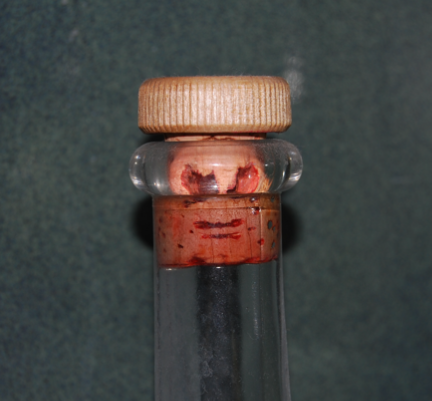
They are everywhere! In every corner you can find one of them if you start looking!
This one has been found in our bathroom. Stay tuned - i report if i find anotherone :-)
meatmonster
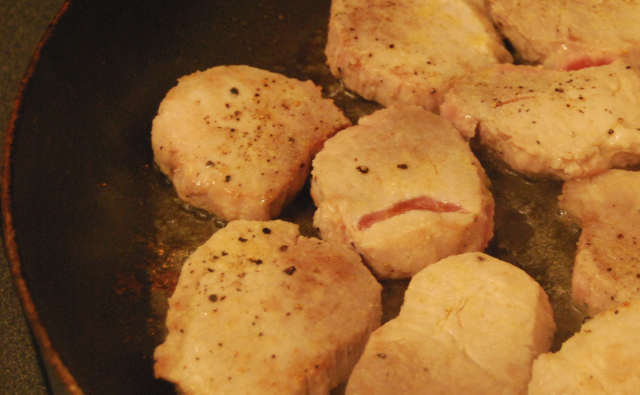
Today i got realy scared while cooking - a meatmonster started to appear in my frying pan :-)
I guess it's a relative from the evil mango of death
SLR controlling via computer
Today i managed to shoot photos and download them in one step using a little c++ programm. the camera must be set to the MTP/PTP-Mode for this to work. The programm below uses the libgphoto2-API to control the camera and send it a capture command followed by a download command. the library is realy nice to code with, but very badly documented.
read more ...Ascii-art robot
          ()               ()
            \             /
           __\___________/__
          /                 \
         /     ___    ___    \
         |    /   \  /   \   |
         |    |  H || H  |   |
         |    \___/  \___/   |
         |                   |
         |  \             /  |
         |   \___________/   |
         \                   /
          \_________________/
         _________|__|_______
       _|                    |_
      / |                    | \
     /  |            O O O   |  \
     |  |                    |  |
     |  |            O O O   |  |
     |  |                    |  |
     /  |                    |  \
    |  /|                    |\  |
     \| |                    | |/
        |____________________|
           |  |        |  |
           |__|        |__|
          / __ \      / __ \
          OO  OO      OO  OO
read more ...Touchless Multitouch in Processing
update (23.11.2008): i made a processing library out of the codeexample above - guru
Today i read about touchless an opensource sdk microsoft has released. it enables you to track objects using a simple webcam to create apps similar to a multitouch display.
then i spent about 20 minutes coding a processing sketch that does roughly the same :-)
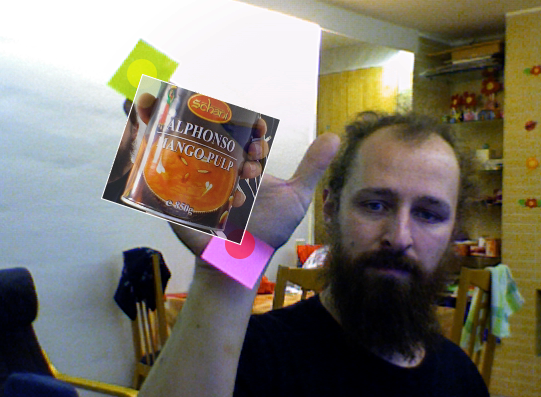
as you can see in the screenshot i cant affort the same cool toys the microsoft coder has in the demo video, so i had to use some post-its instead
below is the complete sourcecode of the app. I didn't export it as an applet this time, because the applet couldn't use the quicktime api. It also only works on mac and windows this time, because processing uses the quicktime api. on linux the gstreamer based replacement from codeanticode can be used.
when the programm starts hold up 2 different colored items (use colors that do not appear in the background) then click on the first color with the left mousebutton and on the second color using the right mousebutton. and then enjoy the "minority report"-experience zooming and rotating the image :-)
import processing.video.*;
import java.util.*;

Capture video;
PImage img;

void setup() {
  size( 640, 480 );
  video = new Capture( this, width, height, 30 );
  img = loadImage( "mangoofdeath.jpg" );
  noStroke();
  smooth();
}

int searchColor1 = color( 128, 255, 0 );
int searchColor2 = color( 255, 0, 0 );

Point e1 = new Point( 0, 0 );
Point e2 = new Point( 640, 480);

boolean s1, s2;


void draw() {
  if ( video.available()) {
     video.read();
     pushMatrix();
     scale(-1,1);
     image( video, -width, 0, width, height );
     popMatrix();

     int idx = 0;

     ArrayList p1 = new ArrayList();
     ArrayList p2 = new ArrayList();
     for ( int y = 0; y < video.height ; y++ ) {
        for ( int x = video.width; x >0; x-- ) {
          if ( match( searchColor1, video.pixels[idx] )) {
            p1.add( new Point( x, y ));
            //fill( 255, 255, 0, 128 );
            //ellipse( x, y, 10, 10 );
          } else if (match( searchColor2, video.pixels[idx] )){
            p2.add( new Point( x, y ));
            //fill( 255, 0, 0, 128 );
            //ellipse( x, y, 10, 10 );
          }
          idx ++;
        }
     }

    noStroke();
    if (p1.size() > 0) e1 = avg( p1 );
    if (p2.size() > 0) e2 = avg( p2 );

    if (s1) {
      fill( 255, 255, 0, 128 );
      ellipse( e1.x, e1.y, 30, 30 );
    }
    if ( s2 ) {
      fill( 255, 0, 0, 128 );
      ellipse( e2.x, e2.y, 30, 30 );
    }

    if (s1 && s2 ) {
      pushMatrix();
      translate( e1.x, e1.y );
      int dx = e2.x - e1.x;
      int dy = e2.y - e1.y;
      rotate( - atan2( e2.x -  + e1.x, e2.y - e1.y) + atan2( img.width, img.height));
      float zoom = sqrt ( dx * dx + dy * dy ) /
           sqrt(img.width * img.width + img.height * img.height);
      scale(zoom, zoom );


      tint( 255, 200 );

      image( img, 0, 0 );
      strokeWeight( 3 );
      stroke( 255 );
      noFill();
      rect( 0,0,img.width, img.height );
      noTint();
      popMatrix();
    }
  }
}

boolean match( int c1, int c2 ) {
  int limit = 20;
   int sr = c1 >> 16 & 0xFF;
   int sg = c1 >> 8 & 0xFF;
   int sb = c1 & 0xFF;

   int cr = c2 >> 16 & 0xFF;
   int cg = c2 >> 8 & 0xFF;
   int cb = c2 & 0xFF;

   return cr > sr - limit && cr < sr + limit &&
     cg > sg - limit && cg < sg + limit &&
     cb > sb - limit && cb < sb + limit;
}

void mousePressed() {
  if (mouseButton == LEFT) {
      searchColor1 = get( mouseX, mouseY );
      s1 = true;
  }
  if (mouseButton == RIGHT) {
     searchColor2 = get( mouseX, mouseY );
     s2 = true;
  }
}

void keyPressed() {
  s1 = false;
  s2 = false;
}

Point avg( ArrayList l ) {
  if (l.size() == 0) {
    return new Point( 0, 0 );
  }
  int x = 0;
  int y = 0;
  for( Iterator i = l.iterator(); i.hasNext(); ) {
      Point p = (Point)i.next();
      x += p.x;
      y += p.y;
  }
  return new Point( x  / l.size(), y / l.size());
}

public class Point {
  int x;
  int y;

  Point( int x, int y ) {
    this.x = x;
    this.y = y;
  }
}
nds line-demo
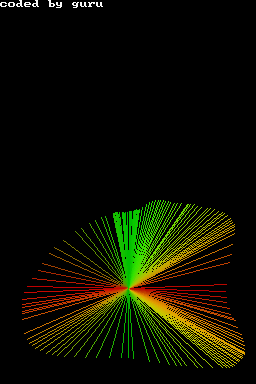
Since my first demo for the Nintendo DS used the bresenham circle algorith, i had to write another starring its famouse brother - the bresenhaml line-algorithm. Which is a bit trickier than it seems when you first look at it. it took me 4 tries to make it work in all quadrants.
For those of you who don't own a nds i included a screenshot this time made using a emulator. imagine the upper part of the screenshot beeing displayed on the upper screen of the DS.
#include <nds.h>
#include <stdio.h>
#include <stdlib.h>
#include <unistd.h>

void setPixel( int x, int y, int color ) {
    VRAM_A[x + y * 256] = color;
}

void line( int x1, int y1, int x2, int y2, int c ) {
    bool swap = abs( y2 - y1 ) > abs ( x2 - x1 );
    int x1t =  swap ? y1 : x1;
    int y1t =  swap ? x1 : y1;
    int x2t =  swap ? y2 : x2;
    int y2t =  swap ? x2 : y2;

    int xs =  x1t < x2t ? x1t : x2t;
    int ys =  x1t < x2t ? y1t : y2t;
    int xt =  x1t < x2t ? x2t : x1t;
    int yt =  x1t < x2t ? y2t : y1t;

    int dx = xt - xs;
    int dy = abs(yt - ys);

    int dT = 2 * ( dy - dx );
    int dS = 2 * dy;
    int d = 2 * dy - dx;
    int x = xs;
    int y = ys;

    if ( swap )  {
        setPixel( y, x, c );
    } else {
        setPixel( x, y, c );
    }

    while ( x < xt ) {
        x++;
        if ( d < 0 ) {
            d = d + dS;
        } else {
            if ( ys < yt ) {
                y++;
            } else {
                y--;
            }
            d = d + dT;
        }
        if ( swap )  {
            setPixel( y, x, c );
        } else {
            setPixel( x, y, c );
        }
    }
}

int main(void) {
    touchPosition touch;
    // set lower screen to FB
    videoSetMode(MODE_FB0);
    vramSetBankA(VRAM_A_LCD);

    // set upper stcreen to textmode
    videoSetModeSub(MODE_0_2D | DISPLAY_BG0_ACTIVE);
    vramSetBankC(VRAM_C_SUB_BG);
    SUB_BG0_CR = BG_MAP_BASE(31);
    BG_PALETTE_SUB[255] = RGB15(31,31,31);
    consoleInitDefault((u16*)SCREEN_BASE_BLOCK_SUB(31), (u16*)CHAR_BASE_BLOCK_SUB(0), 16);

    iprintf("coded by guru
");
    // make sure main screen is on bottom
    lcdMainOnBottom();

    while(1) {
        scanKeys();

        if(keysHeld() & KEY_TOUCH) {
            touch=touchReadXY();
            line( 128, 96, touch.px, touch.py, RGB15(
                31 * abs(touch.px - 128) / 128,
                31 * abs(touch.py-96) / 96,
                0
            ));
        }

        // clear screen if key A is pressed
        if (keysHeld() & KEY_A) {
            for ( int y = 0; y < 192; y ++ ) {
                for ( int x = 0; x < 256; x ++ ) {
                    setPixel( x, y, 0);
                }
            }
        }
    }
    return 0;
}