


Tunnel effect in processing using copy
i worte a little tunnel effect using the copy command and a transparent rectangle in processing. i use no perlin noise in this sketch, just a plain random and copy command that scales the image and a transparent rect, to make the older pixel fade out. (don't ask me why it has to be 19 pixel less then width, but when i use 20 it gets dragged to the lower right corner)
copy(10, 10, width-19, height-19,0,0,width, height );
fill(0,10);
rect(0,0,width, height );
click here to see it in action
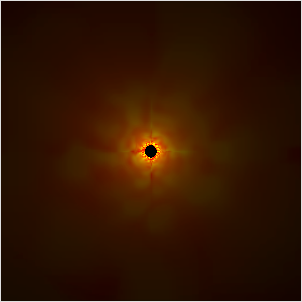
code:
/**
* a tunnle effect by <a href="https://www.local-guru.net/blog">Guru</a>
*/
void setup() {
  size(300,300);
  frameRate(25);
}

void draw() {
  noStroke();
  copy(10, 10, width-19, height-19,0,0,width, height );
  fill(0,10);
  rect(0,0,width, height );
  pushMatrix();
  translate( width/2, height/2 );
  stroke(255);
  strokeWeight(2);
  for( int i = 0; i < 360; i++ ) {
    stroke( 255, random(255), 0);
    point( cos(radians(i)) * 7, sin(radians(i)) * 7 );
    point( cos(radians(i)) * 8, sin(radians(i)) * 8 );
  }
  popMatrix();
}


See also:
sketch experiment 7 - osc events
nested cubes in processing
processing phaseflower
Time Perception
de jong attractor
nested cubes in processing
processing phaseflower
Time Perception
de jong attractor
<<< copy(10,10,width-20,height-20,0,0,width-1,height-1); translate((width-1)/2,(height-1)/2);