


5x7 LED Matrix on my arduino
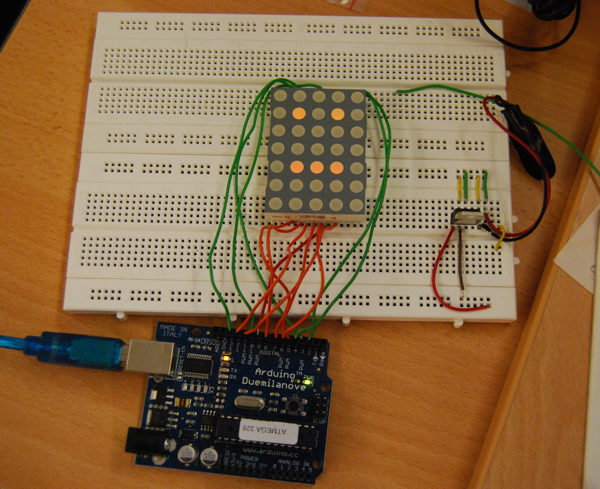
I just hooked up my 5x7 led matrix to an arduino :-)
very cool, i use the led matrix without any other parts as shown in the arduino playground
the next thing i want to do is solder it to one of my protoshields
(ignore the right part of the circuit, it is a currency regulator from another project, but i had no empty breadboards left :-))
int idx = 0; unsigned long last;
void setup() {
  last = millis();
  pinMode( 9, OUTPUT );
  pinMode( 10, OUTPUT );
  pinMode( 11, OUTPUT );
  pinMode( 12, OUTPUT );
  pinMode( 13, OUTPUT );

  pinMode( 2, OUTPUT );
  pinMode( 3, OUTPUT );
  pinMode( 4, OUTPUT );
  pinMode( 5, OUTPUT );
  pinMode( 6, OUTPUT );
  pinMode( 7, OUTPUT );
  pinMode( 8, OUTPUT );

   for( int r = 0; r < 7; r++) {
     digitalWrite( r + 2, LOW );
   }
   for( int c = 0; c < 5; c++) {
     digitalWrite( c + 9, HIGH);
   }
}

byte leds[7][5];

void setPattern( byte pattern[20][5], int idx ) {
  for( int r =0; r < 7; r++) {
    for( int c = 0; c < 5; c++) {
      leds[r][c] = pattern[r + idx][c];
     }
   }
}

void draw() {

  for( int r =0; r < 7; r ++ ) {
    digitalWrite( r + 2, HIGH );
    for( int c=0; c < 5; c ++ ) {
      digitalWrite( 13 - c, ( leds[r][c] == 1 ? LOW : HIGH ));
    }
    delayMicroseconds(900);
    digitalWrite( r + 2, LOW );
  }
}

void loop() {
  if ( millis() - last > 400 ) {
    idx = (idx == 0 ?  7 : 0);
    last = millis();
  }

  byte tmp[14][5] = {
  { 0,0,0,0,0},
  { 0,1,0,1,0},
  { 0,0,0,0,0},
  { 0,1,1,1,0},
  { 0,1,0,1,0},
  { 0,1,1,1,0},
  { 0,0,0,0,0},

  { 0,0,0,0,0},
  { 0,1,0,1,0},
  { 0,0,0,0,0},
  { 0,0,0,0,0},
  { 0,1,1,1,0},
  { 0,0,0,0,0},
  { 0,0,0,0,0},
  };

  setPattern( tmp, idx );
  draw();
}


See also:
5x7-ledmatrix-shield
Arduino based Midi Trigger box for analog synths
YesNoBot
from now on you shalt be called miditron
Midified Monotron first track
Arduino based Midi Trigger box for analog synths
YesNoBot
from now on you shalt be called miditron
Midified Monotron first track
Please, You can post exaclty wire in respective pin , because in this photo the pin and wire is not clean
Tks
Please, You can post exactly wire in respective pin , because in this photo the pin and wire is not clean
Tks
i connected pins 2-8 to the rows of the matrix and pins 9-13 to the columns
so the cabeling is (left pin of arduino - right pin of knightbright)
rows 2 - 9, 3 - 14, 4 - 8, 5 - 12 or 5. 6 - 1, 7 - 7, 8 - 2
columns 9 - 6, 10 - 10, 11 - 4 or 11, 12 - 3, 13 - 13
Dear Nikolaus,
I just got into this whole Arduino thing and I got this LED Matrix from a friend of mine. Your blog entry is the first thing about this on the internet that looks promising to me. Unfortunately, your last comment - the one, in which you explain the cables - is (sorry for this) very poor. Could you please help me, I'm desperatly looking for a guide here.
Thanks in advance Fred
PS: Could you please send it to me via e-mail? That'd be great, thanks!
same here, can you post a picture with both sides of the Matrix, to see where pins go, (down side of a designer, graphically oriented) thanks.
Great write-up. I'm working on a similar issue with what appears to be an identical LED matrix. If you search for the product info on google, you can find a datasheet with the pin-outs. I believe the manufacturer is Lite-on. I will definitely be back here when I start mine, and I will post anything useful I find.
ok, it's worth noting that this was a LONG time ago and it might not be useful to anyone but me, but here goes:
My matrix appears to have the same pinouts. The key is that you MUST find the datasheet for your matrix. If you can't find one, you're pretty well in trouble because without knowing the save voltage levels (or color) of your leds, you won't be able to even experiment.
I successfully connected and tested this using this sentence "i connected pins 2-8 to the rows of the matrix and pins 9-13 to the columns "
That's really all there is to it. This means that you go to your datasheet, identify which pin on the matrix is pin 1 and which is pin 14(in my case, this is why his instructions SEEMED confusing yet followed the datasheet exactly) and start plugging away. Here is my slightly simplified version: Arduino Digital OUT | MATRIX Pin in 2|9 (row 1) 3|14 (row 2) 4|8 (row 3) 5|12 OR 5, they're connected! (row 4) 6|1 (row 5) 7|7 (row 6) 8|2 (row 7) 9|13 (col 1) 10|3 (col 2) 11|4 OR 11, they're connected!(col 3) 12|10 (col 4) 13|6 (col 5)
The only issue I have with mine is some pretty nasty ghosting. I'm going to try to light them with PWM instead of HIGH and see how my results turn out. I have a mega board and no shortage of PWM pins :)
Blasted formatting. Here goes: http://img109.imageshack.us/img109/79/screenshot20110204at104.png
HA! I noticed the HTML formatting option. HERE you go!
Arduino Digital OUT | MATRIX Pin in
hi, can anyone say me how i can multiplex more than one of these matrix with arduino please? Thanks.
please can you tell me what can fail? i have the same led matrix and arduino and i conect all correct!
Hello, I cant display more then 2 characters, if i add a 3 one and set the value of tmp to " byte tmp[21][5] " nothing happens. It just jumps back to the 2 one like there where no third. It would be very nice if you could help me.
Thanks and sorry for my english :)
You can post exaclty wire in respective pin , because in this photo the pin and wire is not clean, i want clear connection
gowtham
Hai, Cane you give more explantation on the program please so i can untherstand wath iT means
Regards Erwin
Andrew, I think you got your columns backwards in comment No. 9. I think you've transposed columns 1 & 5, as well as 2 & 4. Coding it the way you have it turns the characters backwards, meaning you'd have to code the characters backwards in the big sketch chunks to have the oriented correctly on display. Still, this was very helpful tutorial, and thanks.
Here is the correct Arduino (left) to matrix pin (right) pairing that worked for me with a 5x7 matrix.
THE RESISTORS are required to limit the current.Connecting the matrix like this causes that the circuit works in extreme conditions. http://dangerousprototypes.com/docs/Basic_Light_Emitting_Diode_guide
How do you display more than 2 characters?