Smiley-O-Mat
I just finished my Smiley-O-Mat - it's a tin-box with 3 turning knobs that allows you to controll the appearence of a smiley. With 3 simple turns I can now tell your co-workers, familymembers, ... how you feel at the moment and if it is wise to talk to me right now :-)
The controllerbox is made with an arduino, the smiley generator is written in processing, and the turning knobs are printed on my makerbot
This is what the controller looks like
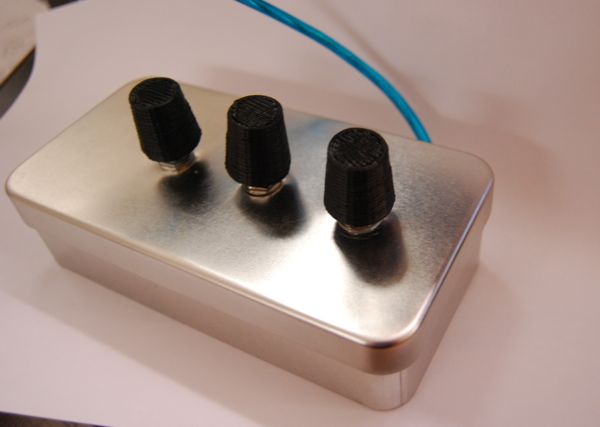
and here are some smileys i generated






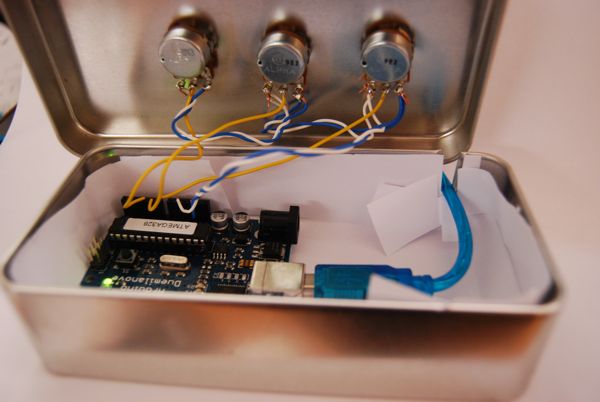
The box contains an arduino that is wired to three variable resistors with 100kOhm the middle connectors (yellow wire) go to analog 0, 1 and 2 the white one is ground and the blue one is +5V
this is the code that runs on the arduino
void setup() {
  Serial.begin(9600);
}

void loop() {
  if (Serial.available() > 0) {
    int in = Serial.read();
    if ( in == 'a' ) {
      int a1 = analogRead(0);
      int a2 = analogRead(0);
      int a3 = analogRead(0);
      Serial.print( "a " );
      Serial.println((a1 + a2 + a3)/3);

    } else if ( in == 'b' ) {
      int b1 = analogRead(1);
      int b2 = analogRead(1);
      int b3 = analogRead(1);
      Serial.print( "b " );
      Serial.println((b1 + b2 + b3)/3);

    } else if ( in == 'c' ) {
      int c1 = analogRead(2);
      int c2 = analogRead(2);
      int c3 = analogRead(2);
      Serial.print( "c " );
      Serial.println((c1 + c2 + c3 )/3);

    }
  }
}
and this is the processing code that draws the smiley
import processing.serial.*;

Serial ser;
int mouth = 0;
int eye = 0;
color c = color(255, 255, 0 );

void setup() {
  ser = new Serial(this, Serial.list()[0], 9600);
  size(300,300);
  smooth();
  background(255);

}

void draw() {

  int val = readPort('b');
  if ( val > -1 ) {
    if (val < 512) {
      c = color( map(val, 0, 512, 0, 255), 255, 0 );
    } else {
      c = color( 255, map(val, 512, 1024, 255, 0), 0 );
    }
  }
  background(255);

  fill(c);
  ellipse(150,150,250,250);
  strokeWeight(3);

  int tmp = readPort( 'c' );
  if ( tmp > -1 ) {
    mouth = tmp;
  }
  tmp = readPort( 'a' );
  if ( tmp > -1 ) {
    eye = tmp;
  }


  fill(255);
  ellipse( 120, 140, 60, 60);
  ellipse( 180, 140, 60, 60);
  fill(0);
  ellipse( 125, 150, 20, 20);
  ellipse( 175, 150, 20, 20);

  line( 100, 100 + map( eye, 0, 1024, -10, 10), 140, 100 - map( eye, 0, 1024, -10, 10) );
  line( 160, 100 - map( eye, 0, 1024, -10, 10), 200, 100 + map( eye, 0, 1024, -10, 10) );

  noFill();
  beginShape();
  curveVertex(100, 200);
  curveVertex(100, 200);
  curveVertex(150, 180 + map( mouth, 0, 1024, 0, 50));
  curveVertex(200, 200);
  curveVertex(200, 200);
  endShape();


}

int readPort( char port ) {
  ser.write(port);
  for( int i = 0; i < 50; i++ ) {
    delay(10);
    if (ser.available() > 0) {
      String in = ser.readStringUntil(10);
      if (in != null) {
        try {
          String intrim = in.trim();
          if (intrim.charAt(0) == port ) {
            int val = Integer.parseInt(intrim.substring(intrim.indexOf(" ")+1));
            return val;
          }
        } catch (Exception e) {}
      return -1;
      }
    }
  }
  return -1;
}


See also:
Custom Cookie Cutters for the Makerbot
Generating 3D Objects from Heightfields
Printed Processing sketch
My name is 192.168.159.16