ebook pdf border remover
cropborder is a little java-tool i wrote to remove the white border of a pdf file, to make it more readable on an ebook-reader.
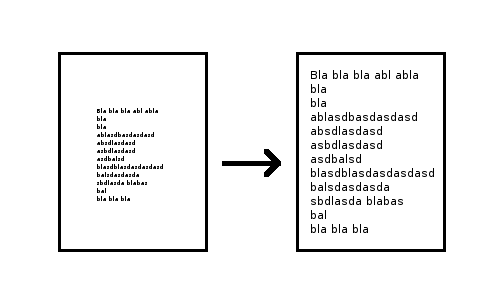
the white margin around the content is very usefull when printed on paper, but is really anoying on an ebook-reader because it only makes the text smaller.
to use the tool call it with
java -jar cropborder.jar [-in <input.pdf>] [-out <output.pdf>] [-f <scaling factor>] [-l <dots to move the left border>] [-d <dots to move the lower border>]
the default values for the parameter are
in.pdf for intput out.pdf for output 1.4 for the scaling factor and shift by -100, and -130 points (a point is a 1/72 inch)
the tool uses the iText library and is published under the "do whatever you like, but don't blame me if it goes boom"-Licence
i also made a project page for it
Download
read more ...


rotated text in reportlabs
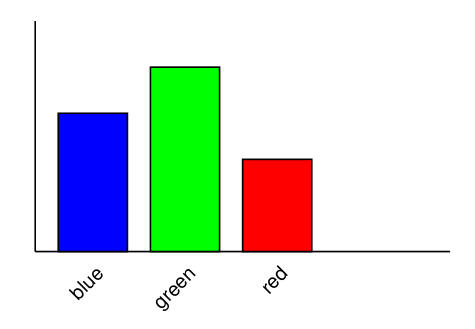
if you want to make a great chart like the one below in reportlab, you need rotated text. it isn't very complicated - its just a bit hard to find som examples on the net.
the canvas in reportlab has a saveState and a restoreState method, and supports rotate and translate similar to openGL or processing. see the code example below who it is done.
ReportLab Test
I just have tested reportlab a python-framework for pdf generation.
from reportlab.pdfgen import canvas
from reportlab.lib.units import cm


c = canvas.Canvas("hello.pdf")

c.drawString(2*cm,28*cm,"Hello World")

c.line( 2*cm, 26*cm, 2*cm, 16*cm)
c.line( 2*cm, 16*cm, 12*cm, 16*cm )

c.setFillColorRGB( 0, 0, 1 )
c.rect( 2.5*cm, 16*cm, 1.5*cm, 7*cm, fill = 1 )
c.setFillColorRGB( 0, 1, 0 )
c.rect( 4.5*cm, 16*cm, 1.5*cm, 6*cm, fill = 1 )
c.setFillColorRGB( 1, 0, 0 )
c.rect( 6.5*cm, 16*cm, 1.5*cm, 8*cm, fill = 1 )

c.showPage()
c.save()
this little script generates a pdf containing 'hello world' and a simple bar-chart. i think i will give it a try if i have to generate pdf-reports the next time
read more ...PDF for N770
I own a Nokia 770 which i use to read pdf-files in the subway. i realy like it, but it has one downside - it is extreamly slow in changing the page if the page has to be zoomed or scrolled. the solution i found was to define a custom papersize for my "print-to-pdf" dialog, which fits into my N770 screen without the need to scroll or zoom.
if i want to read some website-content offline in the subway, i just have to print it to pdf using my custom page-format and copy it to my device using bluetooth.
read more ...